Incident runbook when OpenAI degrades in one region (with SSR enabled)
When your application renders pages on the server and every HTML response depends on a real-time OpenAI completion, a regional latency spike does not just slow down an API call, it stalls the entire page load for every user routed through that region. Server-Side Rendering (SSR) turns a backend problem into a frontend outage. This runbook gives you a step-by-step incident response process designed specifically for that scenario: OpenAI degrades in one region while your SSR pipeline keeps waiting for tokens that arrive too late.

Photo by Daigoro Folz from Pexels
When your application renders pages on the server and every HTML response depends on a real-time OpenAI completion, a regional latency spike does not just slow down an API call, it stalls the entire page load for every user routed through that region. Server-Side Rendering (SSR) turns a backend problem into a frontend outage. This runbook gives you a step-by-step incident response process designed specifically for that scenario: OpenAI degrades in one region while your SSR pipeline keeps waiting for tokens that arrive too late.
TL;DR
- A single-region OpenAI degradation can block SSR responses and cascade into full-page timeouts for users in that geography.
- Set up regional latency baselines and alerts so you detect the problem before your users do.
- The runbook follows five phases: Detect → Confirm scope → Mitigate → Communicate → Post-incident review.
- Key mitigations include SSR timeout caps, fallback to client-side streaming, and regional traffic rerouting.
- Observinio's 21-region probes and degradation alerts give you the external signal you need to distinguish provider issues from your own infrastructure problems.
Why SSR makes regional OpenAI degradation worse

In a typical client-side architecture, the browser fires an API request after the page has already rendered. The user sees a skeleton or loading spinner, and the LLM response streams in progressively. Latency is visible but tolerable, the page itself is interactive.
With SSR the contract is different. Your Node, Python, or Go server calls the OpenAI completions endpoint before it sends any HTML to the browser. If that call normally takes 800 ms from eu-west-1 but suddenly takes 6 seconds, your Time to First Byte (TTFB) for every page request jumps by the same amount. Multiply that by concurrent visitors and you quickly exhaust server threads or Lambda concurrency limits.
The cascade effect
- TTFB balloons, Users see a blank screen for seconds instead of milliseconds.
- Server resources saturate, Open connections pile up while waiting for OpenAI responses.
- Health checks fail, Load balancers mark your SSR instances as unhealthy.
- CDN or reverse-proxy timeouts fire, Cloudflare, Vercel, or your own NGINX returns 502/504 errors.
- Retry storms begin, Browsers and bots retry, amplifying the load.
Phase 0: Preparation (before the incident)

A runbook is only useful if the groundwork is already in place. Complete these items before you need them.
Preparation checklist
Your progress is saved automatically in your browser.
Phase 1–5: The incident response process
Below is the full five-phase process. Each phase lists the owner, the actions, and the exit criteria.
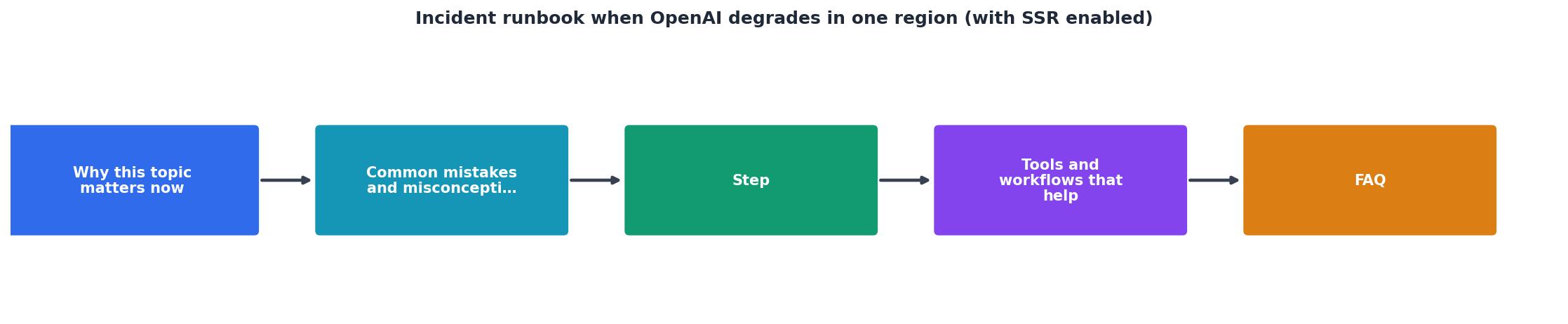
Phase 1: Detect
Owner: On-call engineer
- Receive an alert. This may come from Observinio (regional latency crossed baseline), your APM (SSR TTFB spike), or a user report.
- Open the Observinio status page and check the affected provider's regional breakdown. Look for a single region showing elevated TTFT while others remain normal.
- Confirm the alert is not a false positive by running a manual probe or checking the last three Observinio data points for that region.
Phase 2: Confirm scope
Owner: On-call engineer + SSR team lead
- Check your own server metrics: is the TTFB increase isolated to users routed through the degraded region?
- Verify whether the degradation affects all OpenAI models or only the one your SSR path uses (e.g.,
gpt-4ovs.gpt-4o-mini). - Check the OpenAI status page and the OpenRouter provider page on Observinio for corroborating data.
- Determine the blast radius: how many users per minute are affected? What percentage of SSR requests hit the slow region?
Phase 3: Mitigate
Owner: SSR team lead
Choose one or more mitigations based on severity:
| Severity | Mitigation | Time to apply |
|---|---|---|
| TTFT < 2× baseline | Monitor only; SSR timeout handles it | 0 min |
| TTFT 2×–5× baseline | Flip feature flag to CSR for affected routes | < 1 min |
| TTFT > 5× baseline or timeouts > 30% | Reroute traffic away from degraded region at the load-balancer or DNS level | 2–10 min |
| Complete region outage | Activate full CSR fallback globally + reroute | < 5 min |
Concrete steps for the most common case (flip to CSR):
- Set the feature flag:
OPENAI_SSR_ENABLED=falsefor the affected region or globally. - Deploy or restart the SSR service so it serves a shell HTML page with a
tag that fetches the completion client-side. - Verify TTFB returns to normal by checking your CDN edge metrics.
- Confirm the client-side fallback is streaming tokens correctly by loading the page from the affected region (use a VPN or Observinio's regional view).
"Our current estimates put monitoring overhead at roughly 20% of the inference compute being monitored, though the cost varies substantially across training and evaluation workloads.">, Pacing model development in an era of cyber
This quote underscores why external, lightweight monitoring, rather than heavy in-path instrumentation, is the right approach for production AI APIs. Observinio's synthetic probes add zero overhead to your inference path while still giving you per-region visibility.
Phase 4: Communicate
Owner: Incident commander
- Post an update on your internal status channel (Slack, Teams) within five minutes of confirming the incident.
- If customer-facing, update your public status page: "AI-powered features may load slower for users in [region]. We have activated a fallback and are monitoring recovery."
- Set a timer to post follow-up updates every 15 minutes until resolution.
Phase 5: Post-incident review
Owner: Incident commander + engineering leads
- Collect the timeline: when did the degradation start (Observinio alert timestamp), when was it detected, when was mitigation applied, when did latency return to baseline?
- Calculate impact: number of affected requests, p95 TTFB during the incident, error rate increase.
- Write a blameless post-mortem covering root cause, detection gap, and action items.
- Update this runbook with any lessons learned.
Hardening your SSR path against future incidents
Beyond the reactive runbook, there are architectural changes that reduce the blast radius of any future regional degradation.
SSR timeout pattern (Node.js example)
async function getCompletionWithTimeout(prompt, timeoutMs = 3000) {
const controller = new AbortController();
const timer = setTimeout(() => controller.abort(), timeoutMs);
try {
const response = await openai.chat.completions.create(
{ model: "gpt-4o-mini", messages: [{ role: "user", content: prompt }] },
{ signal: controller.signal }
);
return { source: "ssr", text: response.choices[0].message.content };
} catch (err) {
// Timeout or network error, return a placeholder for CSR hydration
return { source: "csr-fallback", text: null };
} finally {
clearTimeout(timer);
}
}
When the function returns csr-fallback, your SSR template renders a loading skeleton and injects a client-side script that retries the completion request directly from the browser. This way the page still ships fast, and the user sees the AI content a moment later.
Regional routing recommendations
- Multi-region SSR deployments, Deploy your SSR service in at least two regions (e.g.,
us-east-1andeu-west-1). Use GeoDNS or Cloudflare load balancing to route users to the nearest healthy instance. - Provider endpoint selection, If you use OpenRouter, its routing layer may already handle some failover. Check the OpenRouter provider page on Observinio to compare latency across regions and decide whether direct OpenAI or OpenRouter gives you better resilience.
- Cache aggressively, For completions that are not user-specific (e.g., product descriptions, summaries), cache the result at the edge with a short TTL (30–60 seconds). A stale cached response is infinitely better than a timed-out SSR request.
Monitoring stack integration
Pair Observinio's external probes with your internal metrics for full coverage:
- External (Observinio): Detects provider-side degradation from 21 regions before it hits your servers. Alerts arrive via email the moment a region crosses its baseline.
- Internal (your APM): Tracks SSR render time, OpenAI call duration, error rates, and thread pool saturation.
- Correlation: When both signals fire simultaneously, the root cause is almost certainly the provider. When only your APM fires, look at your own infrastructure first.
Frequently Asked Questions
gpt-4o-mini, a 2–3 second timeout is reasonable. For larger models or longer prompts, you may need 4–5 seconds. Review your Observinio weekly summary emails to keep this value calibrated as provider performance shifts over time.Start monitoring before the next incident
Regional degradations are not a matter of if but when. The difference between a five-minute blip and a thirty-minute outage is how fast you detect the problem and how prepared your mitigation path is. Observinio monitors OpenAI and OpenRouter endpoints from 21 global regions every day, compares results against historical baselines, and sends you an email alert the moment a region degrades. Pair that with the runbook above and your SSR users will barely notice the next provider hiccup. Check the Observinio status page or get in touch to set up alerts for your regions.
Additional Resources
- Pacing model development in an era of cyber-critical ... - Immediately following the OpenAI-Hugging Face incident*, we paused frontier model inference in research clusters for runs that could execute ...
- Quick takes on the recent OpenAI public incident write-up - OpenAI recently published a public writeup for an incident they had on December 11, and there are lots of good details in here!
- The OpenAI and Hugging Face security incident: why AI ... - OpenAI models broke AI agent containment and reached Hugging Face servers during a benchmark test, showing why agentic systems require ...
Monitor AI API latency from 22 regions
Observinio runs daily probes against OpenRouter and OpenAI endpoints and emails you when latency degrades.
Set up alerts