OpenAI probe configuration worksheet (during migration projects)
Migrating from one OpenAI integration path to another, whether you are moving from OpenRouter to the direct OpenAI API, switching between model versions, or relocating inference traffic to a new region, is one of the riskiest moments for production latency. Without a structured probe configuration plan, you will discover regressions only after users start complaining. This worksheet gives you a repeatable, step-by-step process for setting up synthetic latency probes before, during, and after any OpenAI-related migration.

Photo by Jeswin Thomas from Pexels
Migrating from one OpenAI integration path to another, whether you are moving from OpenRouter to the direct OpenAI API, switching between model versions, or relocating inference traffic to a new region, is one of the riskiest moments for production latency. Without a structured probe configuration plan, you will discover regressions only after users start complaining. This worksheet gives you a repeatable, step-by-step process for setting up synthetic latency probes before, during, and after any OpenAI-related migration.
TL;DR
- Define baseline latency metrics (TTFB, TTFT, p95) in every target region before you start the migration.
- Configure parallel probes on both the old and new paths so you can compare side-by-side throughout the cutover window.
- Use a phased rollout checklist: pre-migration baseline → dual-probe validation → post-migration confirmation → cleanup.
- Set degradation alert thresholds relative to your measured baselines, not arbitrary round numbers.
- Leverage Observinio's 21-region daily probes and weekly summaries to automate most of this work.
Why migrations break latency assumptions

Every OpenAI integration carries implicit latency characteristics shaped by the endpoint URL, the model version, the authentication path, and the geographic distance between your probe origin and the API gateway. When you change any of these variables during a migration, the latency profile shifts, sometimes dramatically.
Consider a concrete scenario: your platform currently routes all gpt-4o traffic through OpenRouter. You decide to migrate to the direct OpenAI API to reduce one network hop. In theory, latency should drop. In practice, OpenRouter may have had edge caching or connection pooling that masked cold-start penalties on the direct endpoint. Without probes running on both paths simultaneously, you would never isolate this difference.
Common migration types that demand probe reconfiguration include:
- Provider switch, OpenRouter to direct OpenAI, or vice versa.
- Model version upgrade, moving from
gpt-4oto a newer checkpoint that may have different inference characteristics. - Region relocation, shifting your application servers (and therefore probe origins) from US-East to EU-West.
- Authentication change, switching API keys, organizations, or billing tiers that may route to different backend pools.
- Gateway or proxy change, introducing or removing an API gateway, load balancer, or caching layer in front of the OpenAI call.
"A for-profit subsidiary was created in 2019, and a 2025 restructuring converted the subsidiary into OpenAI Group PBC, that is 26% owned by the nonprofit OpenAI Foundation.">, OpenAI
Understanding the organizational structure behind the API matters because infrastructure changes on OpenAI's side, new data centers, revised rate-limit tiers, updated routing, can coincide with your own migration timeline and compound the variables you need to control.
Mapping your probe regions to your user base

Before you write a single probe configuration, you need to answer one question: where are your users? A migration that looks flawless from us-east-1 can introduce 200 ms of additional TTFB for users in ap-southeast-1 if the new endpoint routes differently across the Pacific.
Region selection checklist
Use the following checklist to decide which regions to include in your migration probe set:
- Primary traffic regions, Identify the top three regions by request volume from your application logs. These are non-negotiable probe locations.
- Tail traffic regions, Any region contributing more than 5% of total requests should have at least one probe.
- Compliance-sensitive regions, If you serve users in the EU or other regulated markets, include probes there regardless of traffic volume to verify data-routing behavior.
- Edge-case regions, Pick one or two regions with historically high latency (e.g., South America, Africa, or Oceania) to stress-test the worst case.
- Internal regions, If your backend services call OpenAI server-to-server, add probes from the cloud region where those services run.
Baseline recording template
For each selected region, record the following metrics over at least seven consecutive days before the migration begins:
| Region | Endpoint | Model | TTFB p50 (ms) | TTFB p95 (ms) | TTFT p50 (ms) | TTFT p95 (ms) | Error rate (%) |
|---|---|---|---|---|---|---|---|
| us-east-1 | OpenRouter | gpt-4o | — | — | — | — | — |
| eu-west-1 | OpenRouter | gpt-4o | — | — | — | — | — |
| ap-southeast-1 | OpenRouter | gpt-4o | — | — | — | — | — |
Duplicate this table for the new endpoint so you have a side-by-side comparison target. Seven days of data captures weekday/weekend variance and any provider-side maintenance windows.
Step-by-step probe configuration workflow
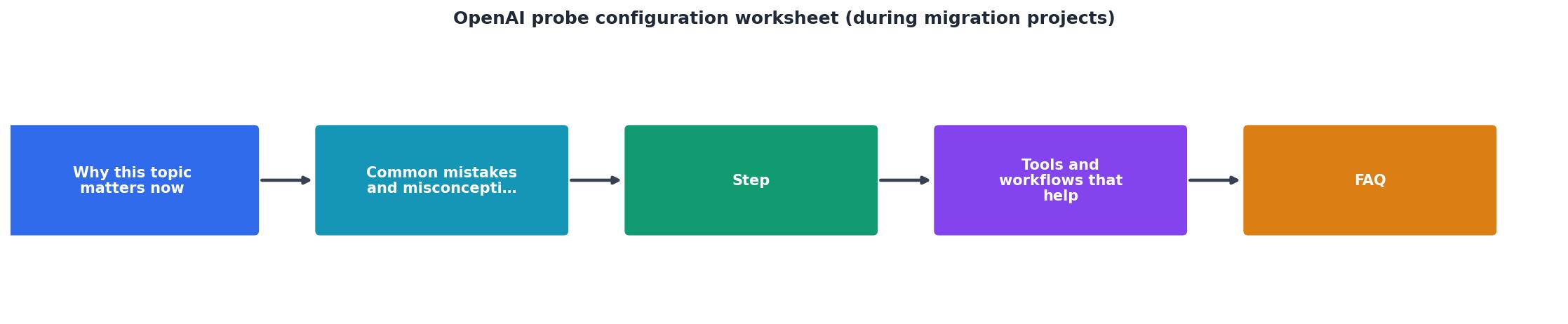
Follow these phases in order. Do not skip the dual-probe phase, it is the only way to get an apples-to-apples comparison under identical network conditions.
Phase 1: Pre-migration baseline (days 1–7)
- Enable probes on the current (old) endpoint in all selected regions. If you are already using Observinio, confirm that probes are active and collecting data on the
/statuspage. - Record seven days of baseline data. Export or screenshot the weekly summary email for reference.
- Define your latency SLO. For example: "TTFT p95 must remain below 800 ms in all primary regions." Write this down, you will use it as the pass/fail criterion after migration.
- Document the current configuration, endpoint URL, model string, API key identifier (not the key itself), any proxy or gateway in the path, and the SDK version.
Phase 2: Dual-probe validation (days 8–14)
- Add probes for the new endpoint alongside the existing ones. In Observinio, this means configuring a second probe target pointing to the direct OpenAI API (or whichever new path you are migrating to).
- Use identical prompt payloads. The probe request body should match between old and new so that token count and model behavior are controlled variables. A short, deterministic prompt like
"Respond with exactly: OK"withmax_tokens: 3works well. - Run both probe sets in parallel for at least seven days. This gives you a direct comparison under the same time-of-day and day-of-week conditions.
- Compare results daily. Look for:
- TTFB delta between old and new endpoints per region.
- TTFT delta, especially important for streaming migrations.
- Error rate differences, a new endpoint returning more 429s or 503s is a red flag.
- Variance (p95 minus p50), a wider spread on the new endpoint suggests less predictable performance.
Phase 3: Migration cutover (day 15)
- Set degradation alerts on the new endpoint probes. Use the baseline p95 from Phase 2 plus a 15% buffer as your alert threshold. For example, if the new endpoint showed a TTFT p95 of 700 ms, set the alert at 805 ms.
- Perform the cutover in your application code or routing layer.
- Monitor Observinio alerts for the first 24 hours. Any degradation email should trigger an immediate investigation.
- Verify from the application side, check your own APM or logging to confirm that real user traffic now hits the new endpoint and that latency aligns with what the synthetic probes predicted.
Phase 4: Post-migration confirmation (days 16–22)
- Keep both probe sets running for one more week. The old endpoint probes serve as a fallback reference, if the new path degrades, you can instantly compare whether the old path is still healthy.
- Generate a final comparison report. Observinio's weekly summary email will contain the data you need. Confirm that the new endpoint meets your SLO in every primary region.
- Decommission old probes only after the comparison report passes. Remove or disable the old endpoint probes to avoid unnecessary noise.
- Update documentation, record the new baseline values, the alert thresholds, and the date of migration for future reference.
Monitoring the new baseline long-term

A migration is not truly complete until the new endpoint has been stable for at least 30 days. During this period, pay attention to:
- Weekly trend direction. Is TTFT p95 creeping upward week over week? Even a 5% weekly increase compounds into a serious regression within a month.
- Regional outliers. A single region spiking while others remain flat usually indicates a network path change on the provider side, not a problem with your configuration.
- Model update coincidences. OpenAI periodically updates model weights or infrastructure behind the same model identifier. If your probes detect a sudden latency shift that does not correlate with any change on your side, check the OpenAI status page and community forums.
Alert threshold tuning
After 30 days on the new endpoint, recalculate your alert thresholds based on the fresh baseline. The initial thresholds from Phase 3 were intentionally generous (baseline + 15%) to avoid false positives during the volatile cutover period. Now tighten them:
- TTFB alert: new p95 baseline + 10%.
- TTFT alert: new p95 baseline + 10%.
- Error rate alert: any sustained error rate above 1% over a 15-minute window.
Printable migration probe checklist
Use this condensed checklist as a quick reference during your next migration:
Your progress is saved automatically in your browser.
Frequently Asked Questions
gpt-4o and gpt-4o-mini from OpenRouter to direct OpenAI, create four probe configurations: old-path-4o, new-path-4o, old-path-4o-mini, new-path-4o-mini. Run all four in parallel during the dual-probe phase. This prevents a regression in one model from being masked by stable performance in another.Start monitoring before you migrate
If you are planning an OpenAI migration and do not yet have synthetic probes in place, now is the time to set them up, not the day of the cutover. Observinio's daily probes across 21 global regions give you the baseline data this worksheet requires without any custom infrastructure. Enable degradation alerts and weekly summary emails on the Observinio status page so that your migration has a measurable safety net from day one.
Additional Resources
- OpenAI | Research & Deployment - We believe our research will eventually lead to artificial general intelligence, a system that can solve human-level problems.
- ChatGPT: Chat, Work, Create & Code with AI - Use ChatGPT to answer questions, write, create images, complete work, and code—all in one place. Get started for free or download the app.
- OpenAI - OpenAI is an American artificial intelligence (AI) public benefit corporation headquartered in San Francisco. It develops proprietary generative AI models,
Monitor AI API latency from 22 regions
Observinio runs daily probes against OpenRouter and OpenAI endpoints and emails you when latency degrades.
Set up alerts