OpenAI probe configuration worksheet (for accessibility audits)
Running an accessibility audit on an AI-powered product is not just about checking color contrast and ARIA labels. When your application calls the OpenAI API to generate alt text, screen-reader-friendly summaries, or real-time captions, the latency of that API call becomes an accessibility concern in itself. A user relying on assistive technology who waits eight seconds for an AI-generated description faces a fundamentally degraded experience compared to a sighted user who can simply glance at the image. This worksheet helps you configure synthetic probes against OpenAI endpoints so that every accessibility audit you run includes hard latency data from the regions your users actually occupy.

Photo by Jeswin Thomas from Pexels
Running an accessibility audit on an AI-powered product is not just about checking color contrast and ARIA labels. When your application calls the OpenAI API to generate alt text, screen-reader-friendly summaries, or real-time captions, the latency of that API call becomes an accessibility concern in itself. A user relying on assistive technology who waits eight seconds for an AI-generated description faces a fundamentally degraded experience compared to a sighted user who can simply glance at the image. This worksheet helps you configure synthetic probes against OpenAI endpoints so that every accessibility audit you run includes hard latency data from the regions your users actually occupy.
TL;DR
- Accessibility audits must account for AI API latency, slow responses degrade the experience for users who depend on AI-generated content (alt text, captions, summaries).
- Configure OpenAI probes in every region where assistive-technology users are located, not just your primary data center.
- Define TTFB and TTFT thresholds that map to WCAG timing guidelines and your product's accessibility SLOs.
- Use a structured worksheet to document probe endpoints, regions, alert thresholds, and audit cadence.
- Automate degradation alerts so accessibility regressions surface before the next quarterly audit.
Why accessibility audits need latency probes

Traditional accessibility audits focus on static markup: heading hierarchy, form labels, keyboard navigation, and color contrast ratios. These checks are necessary but insufficient when your product offloads critical content generation to an external API. Consider these scenarios where OpenAI latency directly impacts accessibility:
- Dynamic alt text generation, A visually impaired user navigates to a product page. Your app calls
gpt-4oto produce a description of the hero image. If TTFT exceeds three seconds, the screen reader announces nothing useful while the user waits. - Real-time captioning, A deaf user joins a video call that uses Whisper plus a completion endpoint for summarization. Regional latency spikes turn real-time captions into delayed, out-of-sync text.
- Plain-language summaries, A user with cognitive disabilities requests a simplified version of a legal document. The completion streams in, but a cold-start spike in Southeast Asia adds five seconds of blank screen.
"The purpose of an audit is to identify accessibility issues that might negatively impact the experience of a user with a disability.">, Can ChatGPT Audit Your Website for Accessibility?
In each case, the latency of the OpenAI call is not a performance optimization, it is an accessibility barrier. Your audit must measure it, document it, and set thresholds that trigger remediation.
Defining probe parameters for accessibility SLOs

Before you fill in the worksheet, you need to decide what you are measuring and what "good" looks like in an accessibility context. The following parameters form the backbone of every probe configuration row.
Key metrics to capture
- TTFB (Time to First Byte), How quickly the OpenAI endpoint acknowledges the request. For accessibility, this maps to the moment a loading indicator can appear. WCAG 2.2 Success Criterion 2.2.1 (Timing Adjustable) does not prescribe a hard number, but usability research consistently shows that users with cognitive disabilities lose context after roughly two seconds of unexplained waiting.
- TTFT (Time to First Token), When streaming is enabled, this is the moment the first meaningful content reaches the user's assistive technology. For screen readers, this is the point at which the reader can begin announcing text.
- Total completion time, The wall-clock duration from request to final token. Critical for non-streaming use cases like batch alt-text generation.
- Error rate, A
429or500from OpenAI means the accessibility feature fails entirely. Track the percentage of probes that return non-2xx responses per region.
Setting thresholds
Map each metric to an accessibility-informed threshold:
| Metric | Acceptable | Degraded | Critical |
|---|---|---|---|
| TTFB | < 500 ms | 500 ms – 1 500 ms | > 1 500 ms |
| TTFT | < 1 200 ms | 1 200 ms – 3 000 ms | > 3 000 ms |
| Total completion | < 5 s | 5 s – 10 s | > 10 s |
| Error rate (per region) | < 0.5 % | 0.5 % – 2 % | > 2 % |
These numbers are starting points. Adjust them based on your product's specific accessibility requirements and the assistive technologies your users rely on. A Braille display user may tolerate slightly longer waits than a screen-reader user who expects continuous audio feedback.
The worksheet: step-by-step configuration
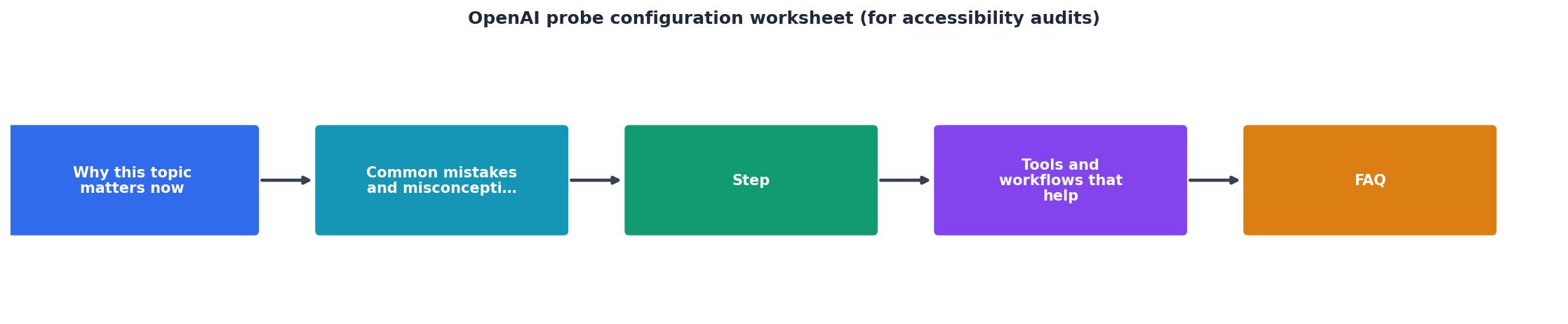
Use the following step-by-step process to fill in one worksheet row per probe. Repeat for every endpoint-region combination your accessibility audit covers.
Step 1: Identify accessibility-critical endpoints
List every OpenAI API call in your application that produces content consumed by assistive technology. Be specific:
POST /v1/chat/completions, modelgpt-4o, used for alt-text generation on the product catalog page.POST /v1/chat/completions, modelgpt-4o-mini, used for plain-language document summaries.POST /v1/audio/transcriptions, modelwhisper-1, used for live captioning.
Step 2: Map endpoints to user regions
Cross-reference your analytics data with your accessibility user base. If 12 % of your screen-reader traffic originates from Western Europe and 8 % from Southeast Asia, those regions must have dedicated probes. Do not assume that a probe in us-east-1 represents the experience of a user in Frankfurt or Singapore.
Step 3: Choose probe frequency
For accessibility audits, daily probes are the minimum. If your product serves real-time accessibility features (captioning, live descriptions), consider probes every six hours. The goal is to capture diurnal latency patterns, OpenAI endpoints often show higher TTFT during North American business hours, which may coincide with off-peak hours in Asia where your captioning users are active.
Step 4: Configure the probe payload
Your synthetic probe should mirror the actual accessibility request as closely as possible. That means:
- Use the same model and temperature settings as production.
- Send a prompt of similar token length. If your alt-text prompt is typically 80 tokens, do not probe with a 10-token "Hello world" prompt.
- Enable streaming if your production code streams tokens to the assistive technology layer.
Step 5: Set alert thresholds and recipients
Use the threshold table from the previous section. Configure alerts so that:
- Degraded triggers an email to the accessibility team lead and the on-call engineer.
- Critical triggers an immediate page and opens an incident ticket tagged
accessibility-regression.
Step 6: Document baseline and audit cadence
Record the baseline latency for each probe at the time of worksheet creation. During each quarterly accessibility audit, compare current probe data against this baseline. A drift of more than 30 % in any metric warrants investigation, even if absolute values remain below the critical threshold.
Worksheet template
Use this checklist to ensure every row is complete before the audit begins:
Your progress is saved automatically in your browser.
Integrating probe data into your audit report
Raw probe data is useful for engineers but insufficient for an accessibility audit report that stakeholders, including legal and compliance teams, need to act on. Transform your probe results into audit-ready findings with these practices:
- Attach regional latency charts to each accessibility feature section of the audit. Show p50, p95, and p99 values, not just averages. A p50 of 800 ms with a p99 of 6 000 ms means one in a hundred users hits the critical threshold.
- Map findings to WCAG criteria. If TTFT exceeds three seconds in a region, reference SC 2.2.1 (Timing Adjustable) and SC 3.2.1 (On Focus) where applicable. Explain that the delay may cause users to believe the feature is broken and navigate away.
- Include trend data. Show whether latency has improved or degraded since the last audit. A weekly summary of probe results over the quarter provides the evidence.
- Recommend remediation. If a specific region consistently exceeds thresholds, document options: deploy a caching layer, switch to a faster model for that region, or add a loading state that meets WCAG timing requirements.
Common pitfalls to avoid
- Probing only from your primary region. If your servers are in
us-east-1but your accessibility users are in Europe, your probes must originate from European regions to capture the real round-trip time. - Using trivial test prompts. A one-token probe does not reflect the latency of a 200-token alt-text generation request. Match production payload size.
- Ignoring streaming behavior. TTFT and total completion time diverge significantly when streaming is enabled. Probe both if your app uses streaming for some features and non-streaming for others.
- Treating the worksheet as a one-time exercise. OpenAI updates models, changes rate limits, and shifts infrastructure. Re-validate your worksheet every quarter at minimum.
Key takeaway: Every OpenAI API call that generates content for assistive technology is an accessibility-critical path. Measuring its latency with region-specific synthetic probes transforms your audit from a static markup review into a living, data-driven process that catches regressions before users experience them.
Frequently Asked Questions
gpt-4o or gpt-4o-mini for text generation tasks (alt text, summaries, simplified language) and whisper-1 for transcription-based features. Do not assume that latency characteristics are identical across models, smaller models like gpt-4o-mini generally have lower TTFT but may produce less detailed alt text, creating a quality-versus-speed tradeoff that your audit should document.429 responses) should be tracked as part of your error-rate metric. If your probes themselves trigger rate limits, reduce probe frequency or use a dedicated API key with its own rate-limit tier for synthetic monitoring. In your accessibility audit, document any periods where rate limiting caused the accessibility feature to fail entirely, a 429 that prevents alt-text generation is a complete accessibility failure, not merely a performance degradation.Monitor your accessibility-critical endpoints with Observinio
If configuring and maintaining probes across multiple regions sounds like more infrastructure than your team wants to build, Observinio already runs daily synthetic probes against OpenAI endpoints from 21 global regions. You get baseline comparisons, regional latency breakdowns, and email alerts when TTFB or TTFT degrades beyond your thresholds, exactly the data your accessibility audit worksheet demands. Visit the Observinio status page to see current OpenAI latency by region, or set up alerts so your accessibility team is notified the moment a critical endpoint crosses into degraded territory.
Additional Resources
- Can ChatGPT Audit Your Website for Accessibility? - In this guide, we'll use ChatGPT as the AI representative and relate and compare ChatGPT current baseline standard to grade the website's ...
- How to Run an Accessibility WCAG Audit: Step-by-Step for ... - In this video, I'll walk you through the basics of web accessibility auditing and writing a report using Google Sheets. ... A Beginner's Guide to ...
- OpenAI Compliance Platform for Enterprise and Edu ... - The Compliance Platform provides access to logs and metadata from your ChatGPT workspace that you can connect with your eDiscovery, DLP, or SIEM tools.
Monitor AI API latency from 22 regions
Observinio runs daily probes against OpenRouter and OpenAI endpoints and emails you when latency degrades.
Set up alerts