
Photo by Alexander Dummer from Pexels
Model upgrades are inevitable. Whether your LLM provider releases a faster checkpoint, routing logic changes, or you migrate endpoints, the question isn't if performance will shift, it's how much, and whether you'll catch regressions before production traffic feels the impact. Latency regression testing before upgrades is the difference between a smooth rollout and an incident that wakes your on-call team at 2 AM.
This guide walks through practical latency regression testing strategies: how to establish baselines, design test scenarios, detect regressions across regions, and automate the process. We'll focus on measurable metrics (TTFB, TTFT) and real workflows that catch slowdowns before they matter.
TL;DR
- Set clear baselines first: Capture TTFB and TTFT under current conditions from all regions you serve. Without baselines, you cannot measure regression.
- Test across all regions early: Latency variance by geography is real; a 50 ms regression in EU might not show in US averages. Use multi-region synthetic probes.
- Automate regression detection in CI/CD: Run latency tests as part of model upgrade validation; fail the deployment if P95 TTFB exceeds thresholds by 10–20%.
- Use realistic traffic patterns: Echo production request distributions, token counts, and concurrency levels in tests. Synthetic traffic that does not match reality will not catch real regressions.
- Monitor post-upgrade for 48 hours: Regression tests catch most issues, but cache effects, regional load balancing, and model variance can surface latency drift hours or days after deployment.
Why Latency Regression Testing Matters Now
Model upgrade cycles have compressed. Major LLM providers push checkpoint releases, quantization tweaks, and endpoint optimizations every few weeks. Each change carries latency risk:
- A new model checkpoint may have different compute characteristics, shifting TTFB by 50–200 ms.
- Routing algorithm updates can cause uneven load distribution across regions.
- Token optimization or batching changes affect time-to-first-token (TTFT) unpredictably.
"Research shows flaky tests reproduce only 17-43% of the time, making governance more effective than debugging individual failures.">, Regression Testing in CI/CD: Deliver Faster Without Fear
The same principle applies to latency: a weak test suite leads to missed regressions; a strong one catches 80–90% of issues in staging. The goal is to make upgrading a low-stress, data-backed decision, not a gamble.
Understanding Latency Metrics for Regression Testing
Before you can test, you need to define what you are measuring. Two metrics dominate LLM API latency:
Time to First Byte (TTFB)
TTFB is the elapsed time from sending a request to receiving the first token in the response stream. For chat interfaces, this is the user-perceived "thinking time" before the assistant begins typing. Typical targets: 200–500 ms for direct OpenAI calls, 300–700 ms for OpenRouter (which adds routing overhead). A 100 ms regression in TTFB is immediately noticeable.
Time to First Token (TTFT)
TTFT is similar to TTFB but measured from the API server's perspective, excluding network transit. It reflects the model's compute latency directly. TTFT regressions often signal model or batching changes. Typical variance: ±50 ms between model versions on the same hardware.
Why Regional Variance Matters
Latency is not uniform globally. A model upgrade tested in your US region may regress significantly in Asia-Pacific due to different infrastructure, CDN routing, or load distribution. Observinio monitors from 21 regions specifically to surface these variances. A regression test that only checks US East is blind to 70% of your user base.
Establishing Reliable Latency Baselines
A baseline is your source of truth. Without it, you cannot measure regression. Build baselines systematically:
1. Collect Baseline Data Over Time
Run synthetic probes from all regions you serve for at least 7–14 days before testing an upgrade. This captures natural variance: time-of-day effects, regional load shifts, provider-side maintenance windows. Collect at least 500 samples per region per metric.
- Probe frequency: Every 2–5 minutes from each region.
- Request templates: Match production traffic patterns, average token count, temperature, model name.
- Concurrency: If you expect 50 concurrent users, send probes at that concurrency level.
2. Calculate Statistical Thresholds
From your baseline, compute:
- P50 (median): Middle value; represents typical performance.
- P95: 95th percentile; catches tail latency spikes.
- P99: 99th percentile; tail risk for SLA-critical scenarios.
- Mean ± 2σ: Standard deviation bands useful for anomaly detection.
| Metric | Value |
|---|---|
| TTFB P50 | 285 ms |
| TTFB P95 | 420 ms |
| TTFB P99 | 580 ms |
| TTFT P50 | 150 ms |
| TTFT P95 | 210 ms |
3. Account for External Factors
Baselines drift due to:
- Time of day: Peak hours (9 AM–6 PM in provider regions) see higher latency.
- Day of week: Weekends often have lower load.
- Provider maintenance: Scheduled updates shift latency for hours.
- Regional events: Major deployments or incidents regionally correlate with latency changes.
Designing Multi-Region Regression Tests

Once baselines are set, design tests that will run before and after an upgrade. The test design determines how many regressions you catch.
Multi-Region Coverage
Do not test from a single region. At minimum, cover:
- US East (primary North American region, usually has lowest latency)
- EU Central (regulatory and user base significance; often shows regional variances)
- Asia-Pacific (highest latency zone; regressions here are easier to miss)
- Any other region where you have significant traffic
Request Distribution
Your test should reflect production traffic:
| Parameter | Typical Range | Test Value |
|---|---|---|
| Prompt tokens | 100–1000 | 500 |
| Max completion tokens | 500–4000 | 1500 |
| Temperature | 0.0–1.0 | 0.7 |
| Top-p | 0.8–1.0 | 0.95 |
| Number of concurrent requests | 1–100 | 10–20 |
| Test duration | , | 5–10 minutes per region |
Test Scenarios
Run multiple scenarios to catch different regression types:
- Baseline scenario: Echo production median request (500 tokens in, 1500 out).
- Heavy tail: Larger requests (2000 tokens in, 4000 out); often regress differently than average.
- Concurrency stress: 50–100 concurrent requests; reveals batching or queue regressions.
- Rapid fire: Burst of 200 requests in 30 seconds; catches routing or throttling regressions.
Step-by-Step Regression Test Workflow
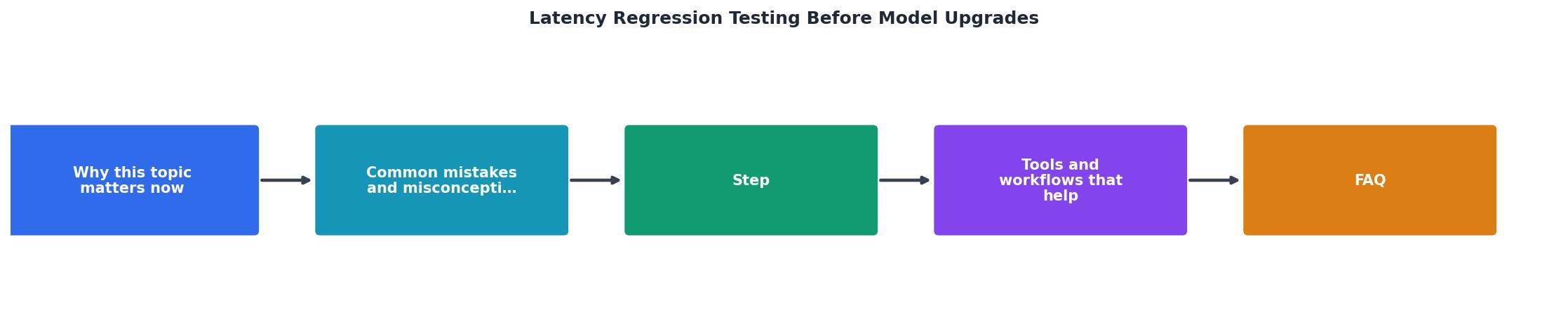
Pre-upgrade (baseline collection phase):
- Deploy a test harness that sends 5 requests/minute from each of your 5+ regions to the current model endpoint.
- Run for 7–14 days; collect at least 500 samples per region.
- Calculate P50, P95, P99 for TTFB and TTFT per region. Set regression thresholds: P95 TTFB ±15% is a typical guard rail.
- Document baselines in your regression test config file.
- Stage the new model endpoint (or routing logic) in a canary/shadow environment.
- Run the same test harness against the staged endpoint from all regions for 10–15 minutes.
- Compare staged metrics against baseline thresholds. If any region's P95 TTFB exceeds threshold by >15%, raise a flag, do not proceed yet.
- If all regions pass, proceed to deployment.
- Deploy the upgrade to production with a feature flag or slow rollout (10% → 50% → 100% traffic).
- Continue running the same test harness against production from all regions for 48 hours.
- Alert if any region's P95 TTFB drifts >15% from baseline for 2+ consecutive test cycles.
- If alerts fire, investigate or roll back immediately.
Automating Regression Detection in CI/CD

Manual regression testing does not scale. Automate it as part of your deployment pipeline.
Integration Points
Add latency regression checks to:
- Pre-merge CI: Before a PR merges (for model/routing config changes), run baseline vs. candidate latency tests.
- Pre-deployment: Before pushing to staging or production, validate against baselines.
- Post-deployment: Monitor live traffic for 48 hours; alert on threshold breaches.
Example CI/CD Configuration
Pseudo-code for a GitHub Actions or GitLab CI workflow:
regression_test:
stage: validate
script:
- export BASELINE_FILE="latency_baselines.json"
- export REGIONS="us-east-1,eu-central-1,ap-northeast-1,ap-southeast-1"
- for region in $REGIONS; do
./test_harness.py \
--endpoint $STAGING_ENDPOINT \
--region $region \
--requests 100 \
--output "results_${region}.json"
done
- python compare_against_baseline.py \
--baseline $BASELINE_FILE \
--results results_.json \
--threshold 0.15 \
--fail-on-regression
only:
- merge_requests
- tags
Alerting Strategy
Set up alerts to page on-call only if:
- Any region's P95 TTFB regresses >20% for 3+ consecutive test cycles.
- Any region's P95 TTFB exceeds absolute threshold (e.g., >750 ms) for 2+ cycles.
- Multiple regions simultaneously show >15% regression (suggests provider-wide issue, not local anomaly).
Common Regression Patterns and What They Signal
Understanding what latency regresses tell you helps prioritize fixes:
| Pattern | Likely Cause | Action |
|---|---|---|
| +100 ms TTFB in all regions uniformly | New model checkpoint is slower compute | Evaluate model trade-offs; consider rollback if unacceptable |
| +50 ms TTFB only in Asia-Pacific | Regional routing change or load imbalance | Check provider's load distribution; may resolve naturally |
| +200 ms P95 TTFB, +20 ms P50 TTFB | Batching or queue regression; tail latency spikes | Review queuing logic; increase concurrency limits if needed |
| TTFB stable, TTFT +150 ms | Network or serialization overhead added | Check payload size, compression settings, or API schema changes |
| Regression worse during business hours | Load scaling or auto-scaling misconfig | Verify scaling policies; may need to increase capacity |
Checklist: Pre-Upgrade Regression Testing
Your progress is saved automatically in your browser.
FAQ
Frequently Asked Questions
Moving Forward
Latency regression testing is not a one-time task, it becomes part of your operational discipline. Start by establishing baselines for your critical endpoints (OpenAI direct or OpenRouter, whichever drives your SLOs). Integrate regression checks into your CI/CD pipeline so that every upgrade candidate is validated before production. Use Observinio's 21-region probes and degradation alerts to catch regressions automatically; configure weekly summaries so your team has a clear picture of latency trends.
The teams shipping reliable LLM features are not guessing about upgrade risk, they are measuring it. Regression testing transforms model upgrades from nerve-wracking events into routine, data-backed decisions.
Set your baselines. Automate your tests. Monitor across regions. Your on-call team will thank you.
Ready to Prevent Latency Regressions?
Observinio monitors your LLM endpoints across 21 global regions, automatically detecting latency regressions before they impact production. Configure regression thresholds for your critical models and get alerted when P95 latency drifts beyond acceptable bounds. Start your baseline collection today and ship upgrades with confidence.
Monitor, measure, deploy without fear.
Additional Resources
- Regression Testing in CI/CD: Deliver Faster Without Fear - The regression testing process works best when it matches your delivery cadence and risk tolerance. Smart timing prevents bottlenecks while ...
- 7 Regression Tests Every AI Agent Should Pass Before ... - These seven regression tests give you a concrete checklist for catching the failure modes that aggregate prompt evaluation will never surface.
- Regression Testing: Strategies, Automation & Scaling Guide - Regression testing is the systematic verification that previously working software functionality has not been broken by recent code changes – ...